



Get the quote sent and approved. Invoice when the job is done.
Use Magic Quote to help price the work while the details are fresh and keep the customer’s reply with the quote. Keep on top of unpaid invoices; Kwilo prompts you on Today when it’s time to follow up.
Record it when it’s fresh. Check it before it goes.
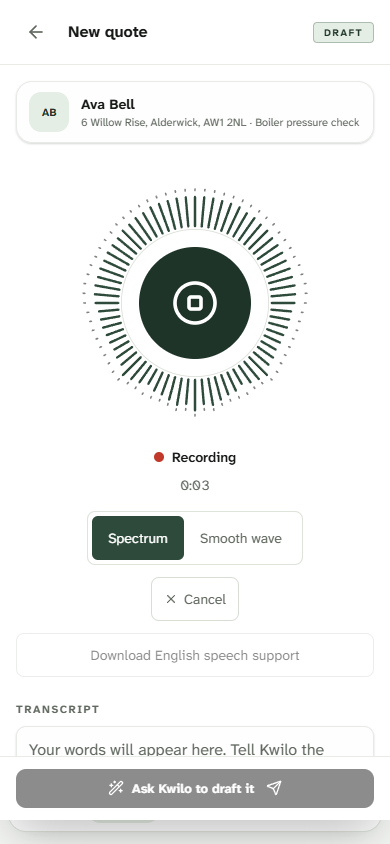
Describe the work in Magic Quote while the details are fresh. Kwilo prepares suggested quote lines for you to check, price and add to the quote.
Kwilo helps, but nothing is sent without your approval.
Get it agreed.
Share the quote by WhatsApp or email. Your customer can review it, approve, reject with a reason or ask a question before deciding.
Today shows questions waiting for your reply. Keep the conversation with the quote, so you both know what was agreed.
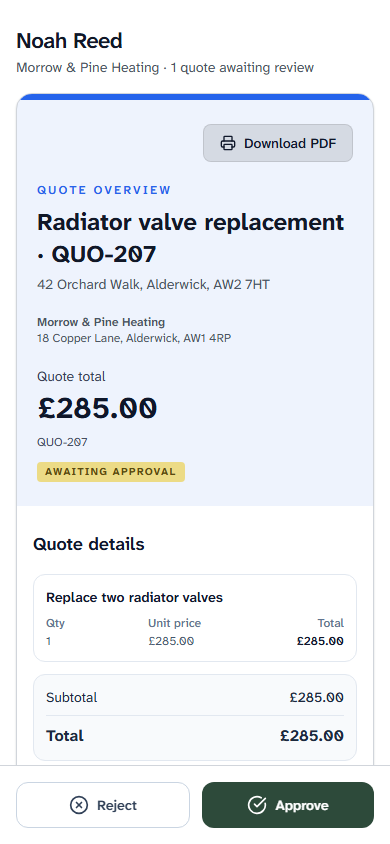
See what your customer sees
A real customer view, using Noah’s fictional £285 quote.
Finish the job. Remember the invoice.
Create the invoice from the job, with approved extras carried through as separate lines.
Today shows completed visits ready to confirm and bill, so the invoice doesn’t get forgotten.
Give customers a clear way to pay.
Add your payment link to the invoice so customers can open it and pay through your chosen provider.
Follow up without the awkward admin.
Kwilo nudges you on Today when invoices go past their due date. See the customer, amount and payment status together, so you know what needs a chase.
Open the invoice and use the WhatsApp button to prepare a message. Check it and send your gentle reminder to the customer.
See the overdue invoice screenWhat about your expenses?
Keeping track of the money going out is important too. See how Kwilo helps with receipts and business costs, or check the price and what’s included.